How it works
A dashboard shows you numbers and leaves the finding to you. This reads your retailer's replenishment and POS data weekly or every morning, finds what is quietly costing you sales, names the recommendation that fixes it, and then checks whether the fix worked. In the retailer's language, because that is the language your buyer and supply chain teams speak.
The refresh cycle
WHEN DATA POSTS
Your retail exports route into a warehouse we keep for you: daily and weekly, store and distribution center, every item you sell. History is kept, so last week is never overwritten by this week.
THEN
Each detector looks for one specific way money leaks: a store that quietly stopped ordering, a DC holding cases while its stores sit empty, a new item granted hundreds of stores that never started flowing, a forecast keyed at half the proven demand.
YOUR MORNING
Ranked by dollars at stake. Each line names the owner and, where there is one, the setting to change and the ask to send, with the store list attached so it can be forwarded without rebuilding the case.
AFTER
A watcher checks whether the store actually started selling again, and banks only the dollars that followed the ask. Watched is not claimed.
The readiness ladder
An item sells only when every rung below it holds. The problem is often one rung down from where everyone is looking. It finds the lowest one that broke, and sends the fix to the person who owns it.
Highlighted: the rung that was broken in Case Study 2, when the retailer expanded an item from 210 stores to 900 overnight and only 220 sold.
Ask for a forecast change. Request a supplemental order. Question a lead time or a minimum. Chase a missing trait. These are things your replenishment manager can already ask for, and the alert names which one. We are not trying to replace the retailer's ordering system.
When the forecast is wrong
You can see the sales. You can see the orders drying up. What you cannot see is the number the retailer's system is ordering to, when it changed, or what to say to get it fixed. So you either live with it, or you go argue with a gut feeling.
The platform keeps a weekly copy of the retailer's forecast from the day you start. When an item goes quiet you can see what the system expected it to sell on the week it decided, not just what it says today.
It puts your real sales next to it. Same stores, same weeks. Where the shelf sold more than the forecast allowed for, that gap is the number, measured off what actually rang.
You get the ask built and ready to send: the item, the stores, the forecast they are on now, the number it should be, and the sales history underneath it. Written so your replenishment manager can act on it without doing the work over.
Some fixes buy you a few weeks. When the warehouse holds cases and the stores sit empty, you get the push list: which stores, how many cases, sized to what that store actually sells. The lasting fix is getting the item set up so the system orders it for you. Every ask says which one you are looking at, so a patch never gets mistaken for a fix.
What the detectors look for
These are the families running in live client cockpits today. Each is gated to skip price cuts, planned resets and pack swaps the retailer intended.
Distribution
Traited stores with no replenishment trait, so no forecast gets built and the DC never auto-orders. The ask names the exact trait.
Distribution
Traited and valid, but no forecast loaded. The system has nothing to order to. Zero-dollar weeks on a store already granted.
Supply chain
The DC holds cases while every traited store it serves sits at zero. Product is in the building and not on the shelf.
Supply chain
Stores are traited and valid, the DC is at zero on hand and zero on order, and nothing has ever been ordered. Have the DC place the order.
Supply chain
Effective days of supply under five with no replenishment response. Order quantity and lost-sales math attached.
Launch
A pack or size change issues new item numbers and the old item's proven demand does not follow. The successor is keyed low, stocked low, sells low, and the low sales confirm the low forecast.
Distribution
Stores that used to buy the item and quietly stopped: a de-trait, a reset, a forgotten price cut. Valued at the store's own trailing rate, gated on recency.
Price
Shown on the Price tab, not raised as an alert. Price cuts and increases measured the same way: units per selling store per week, and the retailer's own margin dollars per store, every settled week at each price.
Detector families as deployed 2026-08. Names are ours; the settings they point to are the retailer's.
Built on your retail data
DailyStore sales and inventory, item by itemWeeklyStore sales and inventory, four-week and 52-weekDailyWarehouse inventory, on hand and on orderWeeklyWarehouse inventoryDimsItem, store, store-DC alignment, traits, modular, forecastPOsOpen purchase orders and their must-arrive-by dates, from the retailer's order systemWeekly and daily cadences both supported. Numbers are built to reconcile back to the source file they came from.
What you get
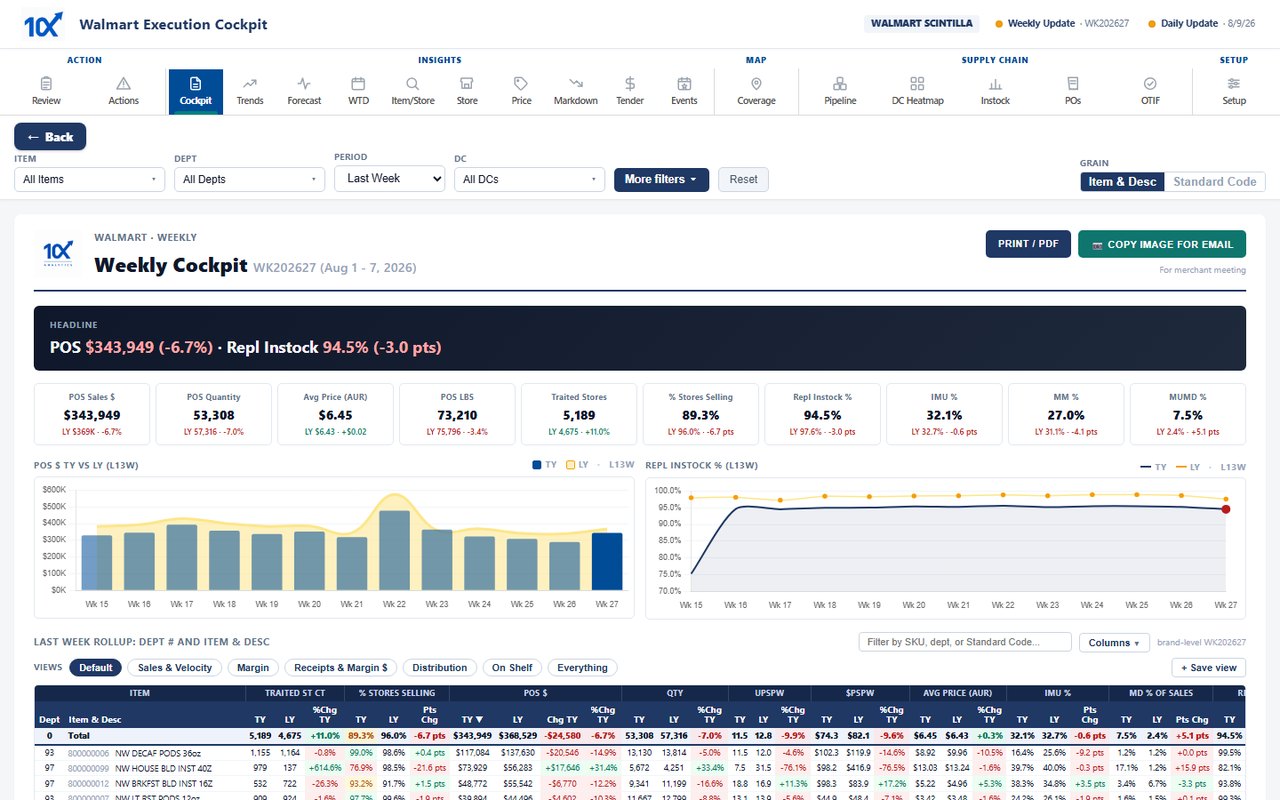
Review: the week's verdict and the top moves. Actions: the ranked queue with owner and ask. Pipeline: every item at every DC, store to shelf, with cases due and readiness. Forecast: where the retailer's forecast and your demand disagree. Instock, POs, OTIF, Price, Markdown, Tender, Trends: each one click deep, no re-aggregation, every number traceable.
Exports are built in: the push script as a workbook their team can act on, the DC-outs list, the store-level facts pack for a line-review conversation.
Nothing to install. It runs in a browser behind a one-time-code login, on infrastructure we manage. You keep pulling your retail reports; the platform does everything after that.
Start here
Thirty minutes on a call. We walk a live cockpit set up for a fictional brand and show you where that problem would surface and what the ask would be. If it is not a fit, I will tell you that.
info@tenxanalytics.comEric Fritts · Founder · 479-713-0714 · Rogers, Arkansas